
When it comes to choosing a contractor in Canada, most homeowners do one thing before picking up the phone, they check reviews. Platforms like HomeStars and TrustedPros aren’t just listings; they’re digital word-of-mouth. And for Canadian tradesmen, mastering review generation can unlock higher rankings, more trust, and a steadier flow of leads.
This guide covers everything: how customer reviews affect SEO, how to request them effectively, how to handle disputes, and how to make your best reviews work even harder for you.
1. How Reviews Impact SEO
Let’s start with why reviews actually matter beyond ego or reputation.
1.1 Local Pack Rankings
Google considers reviews on third-party sites (like HomeStars and TrustedPros) when deciding which contractors show up in its local 3-pack.
- Quantity of reviews
- Quality (star rating)
- Keywords in review text
- Recency and consistency
The more legit, well-written reviews you have, the more likely Google is to push your business to the top.
1.2 Platform Visibility
Both HomeStars and TrustedPros use internal ranking systems. Businesses with more 4-5 star reviews and quicker responses rank higher in their directories. This directly affects how many users see your profile.
1.3 Conversion Rate
More stars equals more clicks. It’s that simple.
Graph: Impact of Review Ratings on Click-Through Rate (CTR)

2. Getting and Asking for Reviews
Now to the meat of it: how do you get more high-quality reviews without begging or bribing?
2.1 Deliver a Review-Worthy Experience
Before you even ask, make sure you’ve:
- Shown up on time
- Communicated clearly
- Cleaned up after yourself
- Explained the work done
Happy customers write good reviews. It starts with great service.
2.2 Ask at the Right Time
Timing is everything.
Best moment to ask: Just after completing a job, when the client is saying “Wow, this looks great!”
Make it personal:
“Would you mind sharing your experience on HomeStars? It really helps us reach more homeowners like you.”
2.3 Make It Easy
Don’t expect people to go find your profile. Send them a direct link to your review form via:
- SMS
- Printed card with a QR code
2.4 Use Review Automation Tools
This is where review automation comes in. Tools like:
- NiceJob
- Grade.us
- Birdeye
- Jobber (with HomeStars integrations)
These platforms allow you to automatically request reviews via email or SMS after a job closes.
Bonus Tip: Customize your message. Generic reminders don’t work nearly as well as a personal, name-included request.
2.5 Incentives? Be Careful
HomeStars prohibits incentives that bias a review. Instead of discounts, encourage honest feedback.
What you can say:
“Your honest review helps others understand what it’s like working with us.”
3. Handling Disputes and Negative Reviews
Let’s face it. You can’t please everyone. Eventually, you’ll get a 1-star review. What matters most is how you respond.
3.1 Respond Calmly and Publicly
A thoughtful, respectful reply shows prospects you’re professional—even when challenged.
Bad example:
“You’re lying. We did the job right.”
Good example:
“We’re sorry to hear you weren’t satisfied. Our goal is always a 5-star experience. Please reach out directly, we’d love to make it right.”
3.2 Use Platform Dispute Features
Both HomeStars and TrustedPros allow business owners to flag reviews that are:
- Fake
- Inaccurate
- Left by someone who never used your service
Don’t abuse this, but if you truly suspect fraud, you can appeal.
3.3 Request Customer Revisions
If you resolve the issue, politely ask if the client would be willing to update their review. Don’t demand it. Just ask.
4. Showcasing Reviews on Your Website
What’s the point of collecting reviews if no one sees them?
4.1 Embed Live Widgets
Both HomeStars and TrustedPros offer widgets or review badges. These can show real-time ratings and reviews directly on your homepage, service pages, or testimonials section.
Benefits:
- Builds trust fast
- Increases conversion rates
- Validates your credibility outside your own words
4.2 Create a “Client Feedback” Page
Dedicate a page to reviews pulled from both platforms. Structure it like this:
- Job Type: Kitchen Renovation, Toronto
- Client: Jane M.
- Platform: 5 stars on HomeStars
- Feedback: “On time, clean, detailed, and respectful of budget.”
4.3 Use Reviews in Proposals and Emails
Social proof works offline too. Quote standout reviews in:
- Service proposals
- Email signatures
- Lead follow-ups
4.4 Don’t Forget Visual Proof
Pair review quotes with photos of the completed job. This strengthens trust and shows you’re not faking it.
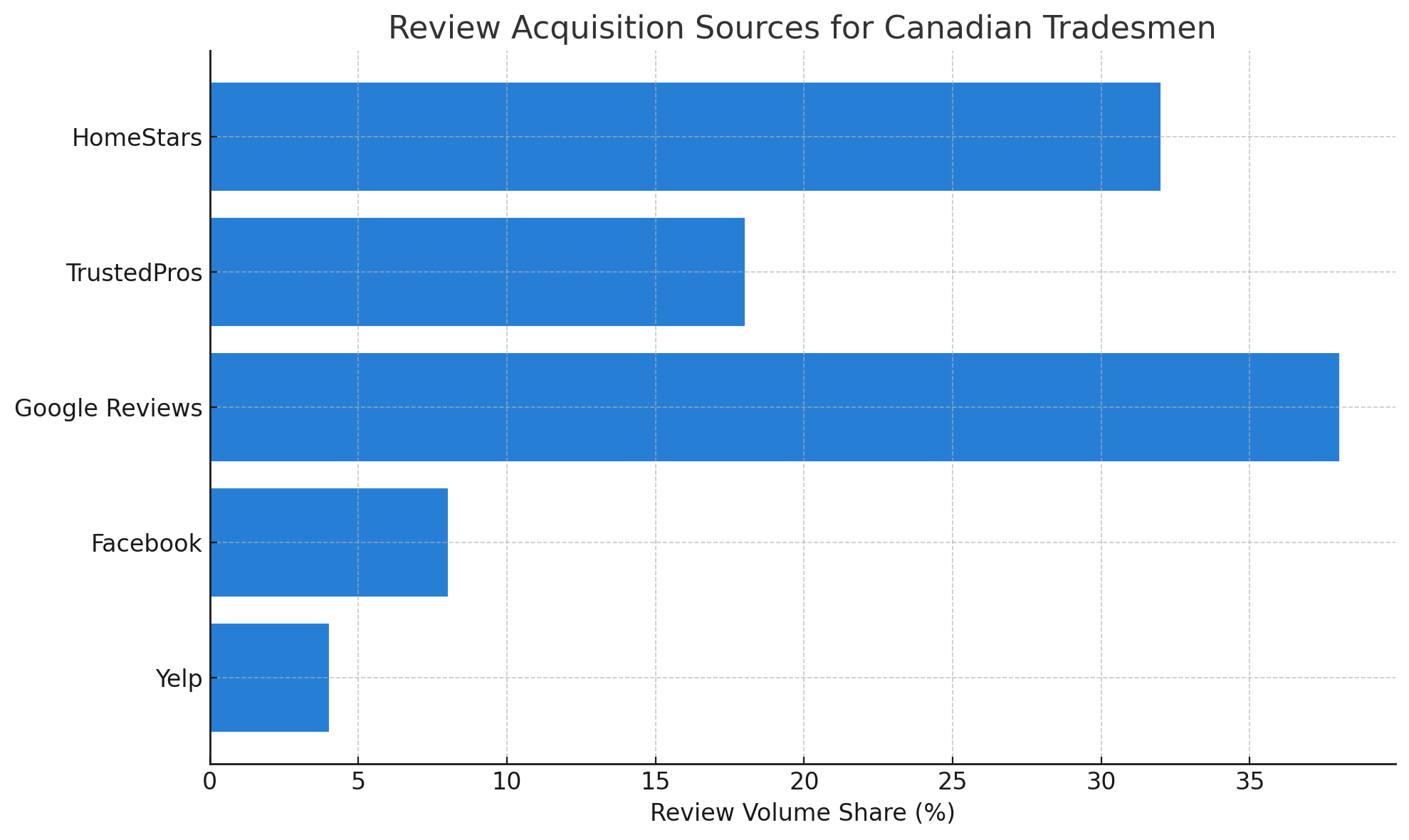
5. Data Snapshot: Where Canadian Trades Reviews Come From
| Platform | Review Volume | Consumer Trust |
| HomeStars | High | Very High |
| TrustedPros | Moderate | High |
| Google Reviews | Very High | Very High |
| Low | Moderate | |
| Yelp | Low | Low |
5.1 Graph: Review Acquisition Sources for Canadian Tradesmen
5.2 Graph: Consumer Trust by Review Platform (Canada)
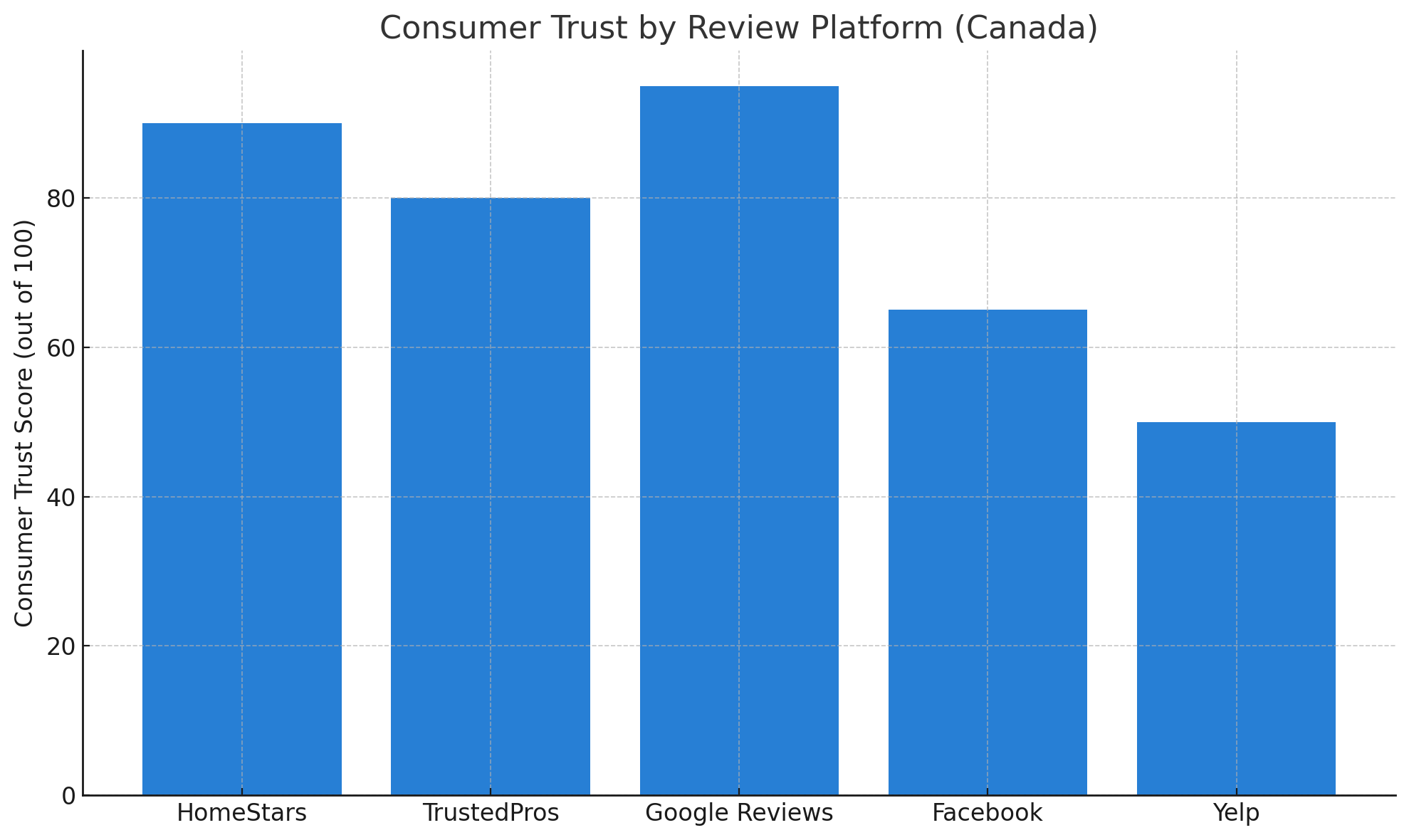
Focus on platforms your ideal client already trusts. For home services in Canada, HomeStars is often the first stop.
6. Negative Review Protocols (And Why They Matter)
If you don’t have a policy in place, your brand is vulnerable.
6.1 Your 3-Step Negative Review Plan
- Acknowledge Quickly
Respond within 24–48 hours. Time shows you’re proactive. - Move It Offline
Provide a phone number or direct email. - Solve, Then Follow Up
Offer to fix the issue. Once resolved, gently suggest a revision.
7. HomeStars vs. TrustedPros: Which to Focus On?
| Feature | HomeStars | TrustedPros |
| Review Visibility | Higher | Moderate |
| Verification Process | Strict | Moderate |
| Customer Volume | Higher | Lower |
| Widget Support | Yes | Yes |
| Cost to Advertise | Higher | Lower |
Recommendation: Start with HomeStars. Add TrustedPros as a secondary channel or if you’re in a smaller market where competition is lower.
7.1 SEO Tip: Use Keywords in Review Replies
When you respond to reviews, weave in local and service-based keywords.
Example:
“Thanks for the kind words, Lisa! We’re glad your kitchen renovation in Vaughan turned out the way you hoped.”
This helps both the review page and your own site rank for those terms.
Common Questions About Review Generation for Tradesmen
How many reviews do I need to rank higher on HomeStars or TrustedPros?
There’s no magic number, but aim for at least 10–15 positive reviews to build initial trust. Businesses with 50+ reviews usually dominate their categories.
Can I ask every customer for a review?
Yes, but do it respectfully and avoid offering rewards. Automated follow-up tools can help streamline this ethically.
What if a customer writes something false in a review?
You can respond publicly to clarify the situation and flag the review to the platform for possible removal if it violates their guidelines.
Should I prioritize Google reviews or HomeStars?
Both matter. Google helps with SEO and Map Pack rankings, while HomeStars builds trust with homeowners actively looking for trades.
Do review platforms penalize businesses for too many negative reviews?
No platform will explicitly penalize you, but your visibility may decline if your average rating drops significantly.
Final Thoughts: Reviews Are Your Most Powerful Marketing Asset
If you want more calls, leads, and contracts, reviews are the bridge. Especially on platforms like HomeStars and TrustedPros, where Canadian homeowners go specifically to hire contractors.
Here’s the key:
- Make asking for reviews part of your job closeout process
- Automate when possible
- Stay professional if feedback isn’t glowing
- Show off the praise you earn
It doesn’t cost anything. But it could be the difference between 2 leads a month and 20.
Want help building a review request system or integrating reviews into your website? Let’s talk.
We design high-performing websites and deliver SEO that gets results. Trusted by businesses across the UK, US, AU, and CA.
www.theseocrunch.com | theseocrunch@gmail.com