In this technology-driven world, establishing a great website and having a strong online presence is crucial for everyone— from business owners to freelancers and even aspiring developers. Designing a website is not only an art but a skill one must learn. In this detailed article, we will navigate through the process of website creation, covering all the phases of web development while explaining all the essentials that define a good website. So, get ready to confidently answer the question “how do I create a website” as we build it together step by step.
Table of Contents
- Why Website Design Matters
- Basics of a Website
- Stages of Web Development
- The Web Design Process: Step-by-Step
- What Constitutes a Good Website?
- Website Structure Design & Outline
- Essential Website Features
- Understanding How a Website Works
- Final Tips and Tools
- Frequently Asked Questions (FAQs)
- Conclusion
1. Why Website Design Matters
A well-crafted website comprehensively enhances user trust, SEO, conversion, and branding. Per Stanford Research, almost 75 percent of users will judge the credibility of a company simply by the design of the website.
2. Basics of a Website
Before handling the design process of the website, it’s good practice to understand the website on a surface level:
- Domain Name: The web address for your website (e.g. www.example.com).
- Web Hosting: The storage of the website files.
- Website Builder: Could be a WordPress, Wix or even designed from scratch using HTML/CSS.
- Frontend & Backend: What the users see and how it works.
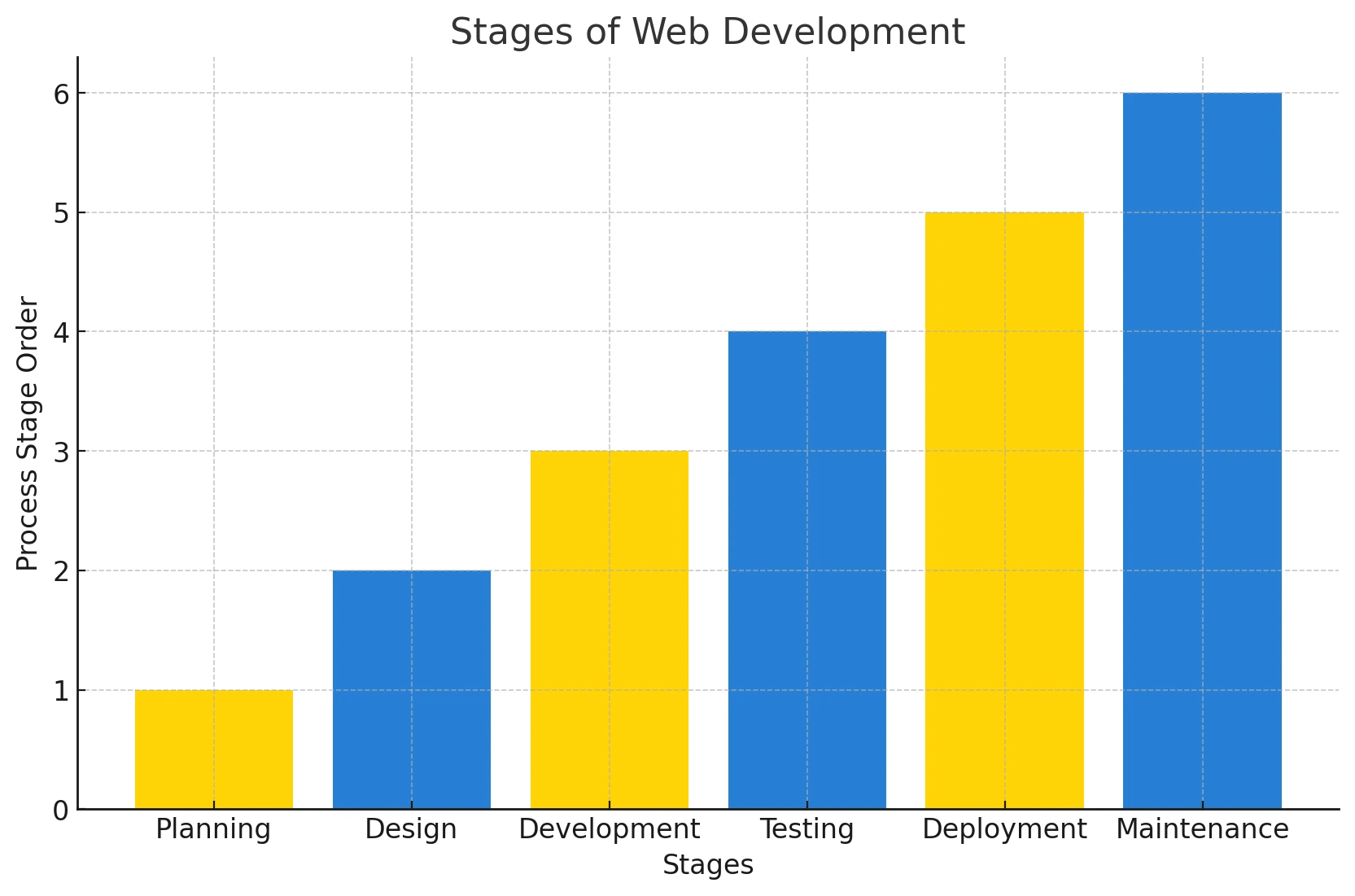
3. Stages of Web Development
With the use of the website, there are steps one typically follows, and that includes going through the Six-stage process to create your website.
- Planning
- Design
- Development
- Testing
- Deployment
- Maintenance
Each of these stages is essential for crafting an effective and professional site.
Below is a visual representation of stages of web development
4. The Web Design Process: Step-by-Step
Step 1: Planning and Research
- Define the website’s objectives
- Identify your target audience
- Research competitors to gather design inspiration for your website templates.
Step 2: Sitemap and Wireframe Creation
- Build a sitemap: the outline of website pages
- Create wireframes to plan the designs
Step 3: Designing the Layout
- Choose color schemes and typography
- Design key pages (Home, About, Contact)
- Ensure mobile responsiveness
Step 4: Developing the Website
- Implementation of the design via HTML, CSS and JavaScript
- Setup CMS system (like WordPress)
- Add domain and hosting services
Step 5: Testing and Optimization
- Test different browsers compatibility
- Loading time assessments (use Google PageSpeed Insights)
- Mobile device adaptability is vital for a responsive website.
Step 6: Launching the Website
- Final review
- Upload files to the server
- Change site status to available!
Step 7: Post-Launch Maintenance
- Update content
- Resolve website errors
- Analyze user’s data to better customize the user experience.
5. What Constitutes a Good Website?
Understanding what makes a good site involves more than looks. Here’s what to consider:
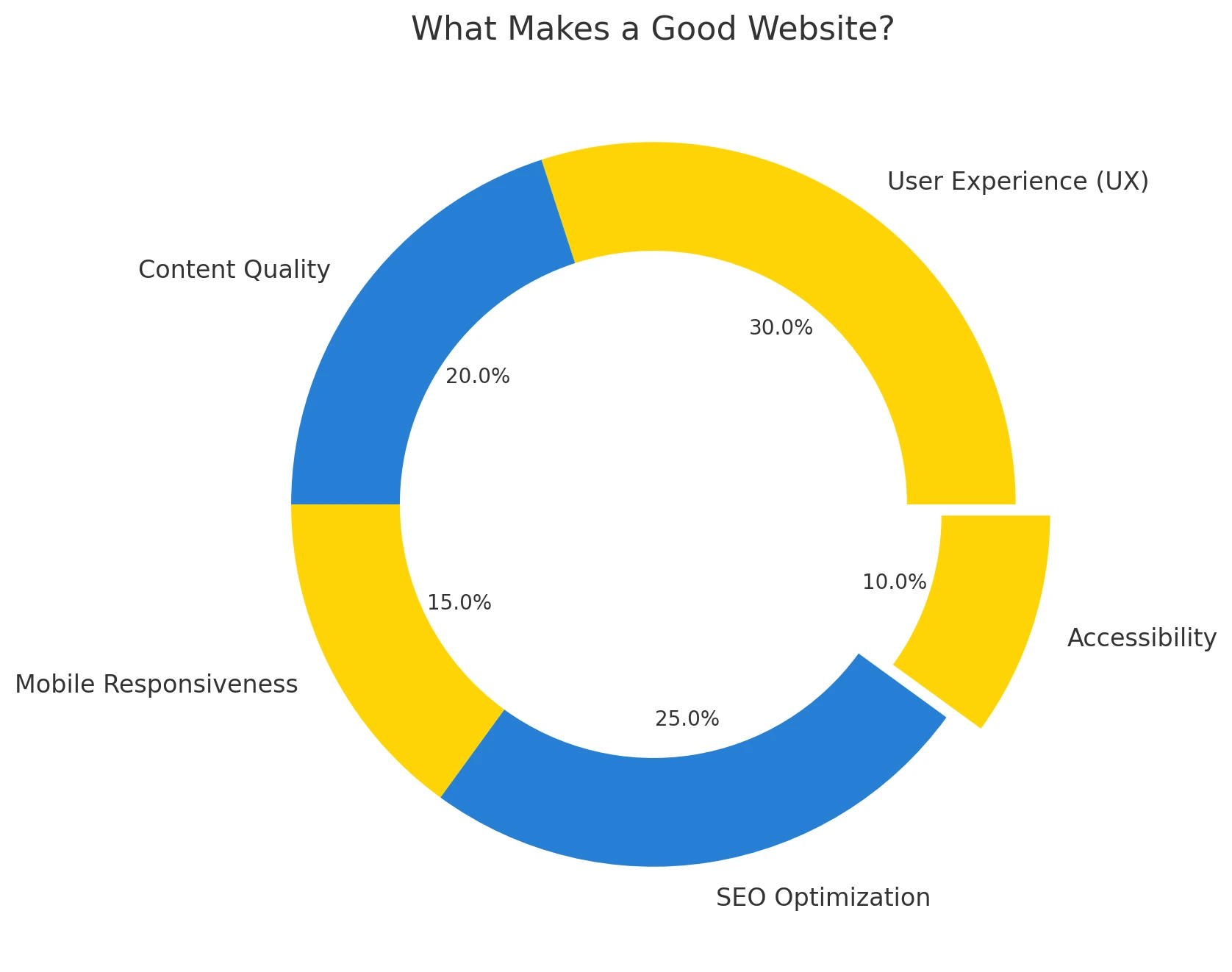
- User Experience (UX): User Experience includes intuitive navigation and quick loading times.
- Content Quality: Readers’ attention is won with informative, well-structured content that aligns with ranking algorithms.
- Mobile Responsiveness: Design should adapt smoothly to smartphones and tablets.
- SEO Optimization: In addition to others, the meta description, headers, and sitemap should also adhere to guidelines.
- Accessibility: ADA compliance for users with disabilities
6. Website Structure Design & Outline
The website structure design is the backbone of the user experience. A clear hierarchy helps users and search engines navigate your site.
Example Structure:
- Home
- About
- Services
- Web Design
- SEO
- Content Marketing
- Blog
- Contact
Tools to Use: Lucidchart, MindMeister, Whimsical
7. Essential Website Features
Here are features every great website should have:
- Website Contact Forms
- Creative CTA (Call-To-Action) Buttons
- Mobile Responsiveness
- Blog or News Section
- Testimonials or Reviews
- Website Navigation Bar
- SSL Security
Pro Tip: Use Google Analytics and Google Search Console to monitor data and performance.
8. Understanding How a Website Works
To understand how a website works, think of it as a combination of:
- Frontend (Client-side): HTML, CSS, JavaScript
- Backend (Server-side): PHP, Python, Node.js, along with various databases
- Website Hosting: Cloud storage for the respective website
- DNS: Directs users to your domain
When a user inputs a domain, the DNS translates it to an IP address. After that, the browser goes to your hosting server and retrieves the necessary files.
9. Final Tips and Tools
Top Tools for Web Design
- Figma / Adobe XD (Design Mockups)
- WordPress / Webflow / Wix (Builders)
- Google Fonts (Typography)
- Unsplash / Pexels (Images)
- GTmetrix (Performance Testing)
Checklist Before Going live
- Responsive on mobile devices
- Functional contact form
- Meta tags for SEO
- SSL certificate installed
- Google Analytics connected
10. Frequently Asked Questions (FAQs)
- How can I make a website for free?
Websites can be created without payment on platforms such as Wix, WordPress.com, and Weebly. These platforms offer free plans that include basic features like drag-and-drop editors and templates. However, ads are displayed on free versions, and customization options are limited, resulting in a less tailored experience.
- What are the first steps in the web design process?
The first steps include establishing the goal of the site, defining the primary audience, researching competitors, and creating the sitemap. This helps in building the backbone of the website and shapes the strategy for its design and content.
- What tools are best for beginners learning web design?
Great tools for beginners include:
- Canva (for simple UI/UX design)
- Figma or Adobe XD (for prototyping)
- WordPress (for content management)
- Elementor or Wix (for drag-and-drop website building)
- What makes a website user-friendly?
A user-friendly website has:
- Clear navigation
- Quick loading times
- Responsive mobile view
- Colors and fonts that are easy to read
- Contact information that is easy to locate
These features are some of the elements that categorize a website as good.
- How long does it take to build a website?
As we said before, the duration will depend on the level of sophistication, ranging from a few hours for the more basic websites, to several weeks or even months for custom-developed sites. The majority of small business websites typically take around 2 – 6 weeks which encompasses planning, design, development, and testing.
- What are the essential website features every site must have?
Every website should include:
- SSL security
- Mobile compatibility
- Search engine optimization
- Fast load times
- Analytics tracking
- Contact forms or CTAs
These are considered essential website features for success.
- What are the key phases of website development?
The phases of website development include:
- Planning
- Design
- Development
- Testing
- Deployment
- Maintenance
Each stage is crucial to the overall success of your project, especially when designing your website.
- How important is mobile responsiveness in web design?
Extremely. Mobile devices account for more than 60% of web traffic, making mobile responsiveness very important. Additionally, Google uses mobile-first indexing, which means the mobile version of your site impacts your search rankings.
- Do I need to know coding to design a website?
Not really. You can build a website using WordPress, Squarespace, or Wix without any coding knowledge. However, knowing the basics of HTML, CSS, and JavaScript would allow for greater customization.
- How does SEO impact web design?
SEO and web design are interrelated. Some features such as
- The speed at which a site loads
- Optimizing for mobile devices
- Content hierarchy
- Headings (H1 to H6)
- URL cleanliness
are critical for ranking higher on searches as well as improving usability.
11. Conclusion
Creating a website may seem complicated, but it is manageable with appropriate guidance and step-by-step instructions. This guide has provided everything you need—from basic website design to the components of a good website.
By following the approaches and steps outlined in this guide, you will certainly build an impactful personal blog, business website, or e-commerce platform.
We design high-performing websites and deliver SEO that gets results. Trusted by businesses across the UK, US, AU, and CA.
www.theseocrunch.com | theseocrunch@gmail.com